
Docker 部署 OpenClaw - 让 AI 控制你的浏览器
大约 3 分钟
Docker 部署 OpenClaw
OpenClaw 是一个强大的 AI 浏览器控制工具,可以让 AI 模型直接操作浏览器完成各种自动化任务。本文介绍如何使用 Docker 部署 OpenClaw 并配置 GLM(智谱AI)模型。
什么是 OpenClaw?
OpenClaw 是一个开源的 AI 代理工具,它能够:
- 🤖 AI 控制浏览器:让大语言模型直接操作浏览器
- 🔧 支持多种模型:兼容 OpenAI、GLM 等多种大模型
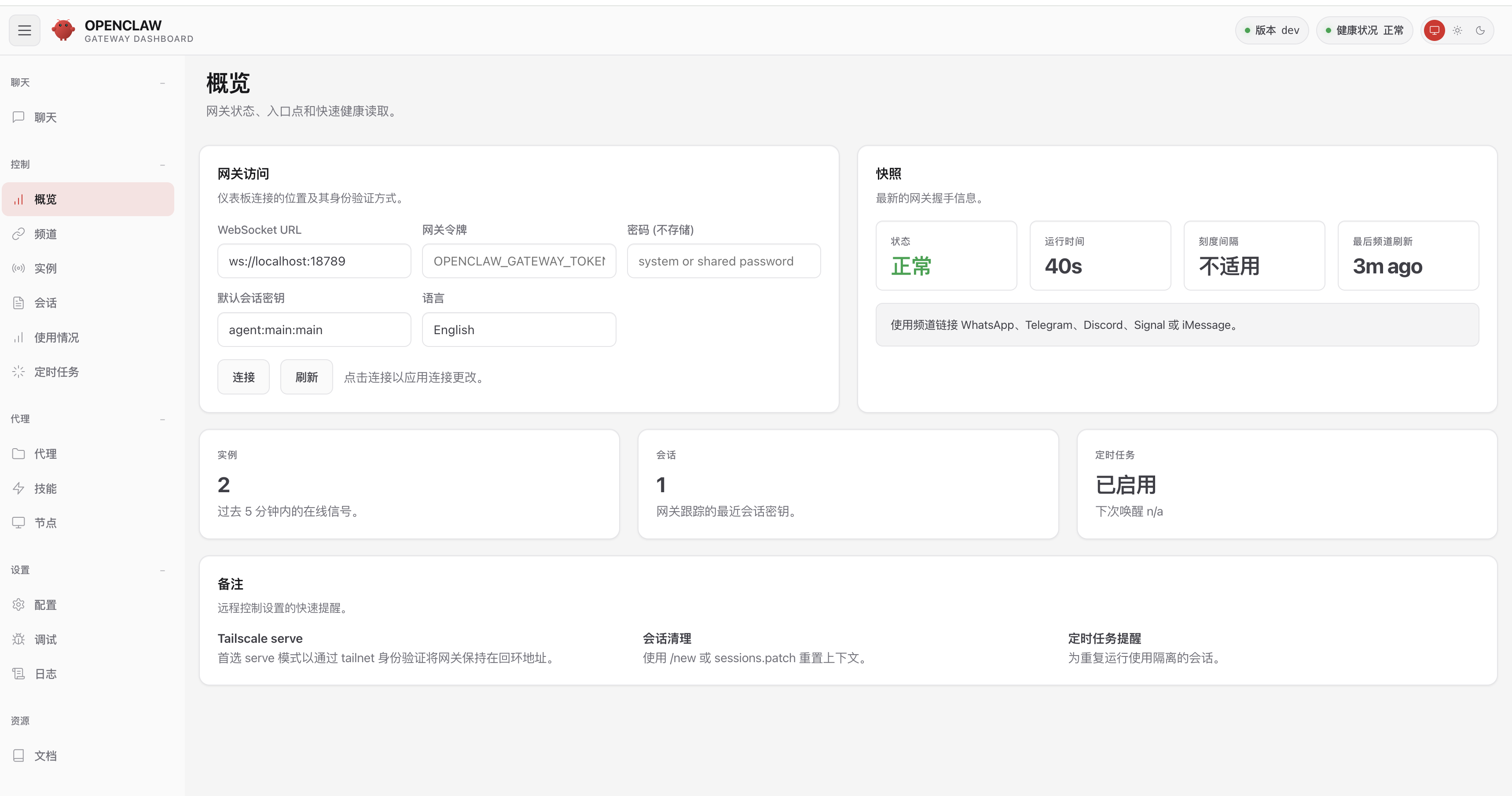
- 🌐 Web 界面:提供直观的 Web 控制面板
- 🔐 安全可靠:支持设备配对认证机制
环境要求
- Docker Desktop 或 Docker Engine
- Docker Compose v2
- 至少 2GB 可用内存
- GLM API Key(从 智谱AI开放平台 获取)
快速部署
1. 创建项目目录
mkdir -p ~/openclaw && cd ~/openclaw
2. 创建 docker-compose.yml
services:
  openclaw:
    image: ghcr.io/openclaw/openclaw:latest
    container_name: openclaw
    restart: unless-stopped
    ports:
      - "18789:18789"
      - "18791:18791"
    volumes:
      - ~/.openclaw:/home/node/.openclaw
3. 启动服务
docker compose up -d
4. 查看启动日志
docker logs openclaw -f
GLM 模型配置
OpenClaw 支持多种大模型,这里以智谱 AI 的 GLM 模型为例。
获取 API Key
- 访问 智谱AI开放平台
- 注册并登录账号
- 在控制台创建 API Key
配置模型
在容器内执行配置命令:
# 配置 GLM 模型提供商
docker exec openclaw openclaw config set 'models.providers.glm' --json '{
  "baseUrl": "https://open.bigmodel.cn/api/paas/v4",
  "apiKey": "你的GLM_API_Key",
  "api": "openai-completions",
  "models": [
    {"id": "GLM-5", "name": "GLM 5"},
    {"id": "GLM-4.7", "name": "GLM 4.7"},
    {"id": "GLM-4.7-FlashX", "name": "GLM 4.7 FlashX"},
    {"id": "GLM-4.6", "name": "GLM 4.6"},
    {"id": "GLM-4.5-air", "name": "GLM 4.5 air"}
  ]
}'

# 设置默认模型
docker exec openclaw openclaw models set glm/GLM-5
配置说明
| 参数 | 说明 |
|---|---|
| baseUrl | GLM API 地址 |
| apiKey | 你的 API Key |
| api | 使用 OpenAI 兼容接口 |
| models | 可用的模型列表 |
设备配对
首次访问 OpenClaw 时,需要进行设备配对。
步骤 1:访问 Web 界面
打开浏览器访问:http://127.0.0.1:18789/
步骤 2:查看待配对设备
如果看到 "pairing required" 提示,在终端执行:
docker exec openclaw openclaw devices list
步骤 3:批准配对请求
使用 Request 列的 ID 批准设备:
docker exec openclaw openclaw devices approve <Request_ID>
示例:
docker exec openclaw openclaw devices approve 633p7693-e607-497f-8bde-2c7b121e0f7d
步骤 4:刷新页面
批准后,刷新浏览器页面即可正常使用。
手机端配对
如果在手机上访问,需要从桌面端获取带 token 的完整 URL:
docker exec openclaw openclaw dashboard --no-open
复制输出的完整 URL(包含 #token=...)到手机浏览器访问。
常用命令
服务管理
# 启动服务
docker compose up -d

# 停止服务
docker compose down

# 重启服务
docker restart openclaw

# 查看日志
docker logs openclaw -f

# 查看最近 50 行日志
docker logs openclaw --tail 50
配置管理
# 查看配置文件
cat ~/.openclaw/openclaw.json

# 查看当前模型
docker exec openclaw openclaw models get

# 列出可用模型
docker exec openclaw openclaw models list
端口说明
| 端口 | 用途 |
|---|---|
| 18789 | Gateway Web 界面 |
| 18791 | Browser Control 服务 |
故障排除
问题 1:端口被占用
检查端口占用:
lsof -i :18789
lsof -i :18791
问题 2:模型调用失败
- 检查 API Key 是否正确配置:
cat ~/.openclaw/openclaw.json
检查网络是否能访问
https://open.bigmodel.cn查看日志排查具体错误:
docker logs openclaw --tail 50
问题 3:配置不生效
重启容器使配置生效:
docker restart openclaw
问题 4:忘记 Gateway Token
查看配置文件获取 token:
cat ~/.openclaw/openclaw.json | grep -A1 '"auth"'
或重新设置:
docker exec openclaw openclaw config set 'gateway.auth.token' '你的新Token'
docker restart openclaw
问题 5:Web 界面显示 __OPENCLAW_REDACTED__
这是正常的安全特性,用于隐藏敏感信息,不影响使用。如需确认实际配置值:
cat ~/.openclaw/openclaw.json
相关链接
感谢支持 · 欢迎交流(请喝咖啡 / 加好友定制化开发)
点击图片可放大查看